Modded Spotify APK Analysis
1. General information
- Nom de l’application: Spotifuck
- Version: 1.6
- Package name: it.deviato.spotifuck
- SHA256: 1848f4a2e9f9c68581b226dd49f4f0cdda2168efac5299a4ace0c67287ec6494
2. Permissions and manifest
The permissions used are:
- INTERNET (connect to the internet)
- RECEIVE_BOOT_COMPLETED (launch automatically when the phone starts up)
- FOREGROUND_SERVICE (start a service in the foreground)
- FOREGROUND_SERVICE_MEDIA_PLAYBACK (for media playback)
- POST_NOTIFICATIONS (send notifications to the user)
- WAKE_LOCK (keep the CPU active even when the screen is off)
- REQUEST_IGNORE_BATTERY_OPTIMIZATIONS (background battery optimization)
- DYNAMIC_RECEIVER_NOT_EXPORTED_PERMISSION (custom permission defined by the app to protect certain internal components)
There is android:persistent=“true” to enable.
Enabling android:persistent=“true” means that the application asks Android to remain in memory even if the system is low on resources.
-
Legitimate use: for a music player, this allows background playback to continue without being interrupted by the system.
-
Potential risk: if a RAT or malicious code were injected into the application, this persistence would allow the malware to remain active at all times, facilitating data collection or remote command execution.
android:persistent=“true”
3. Static code analysis
I use JADX to decompile the APK code. Version 1.6 is obfuscated. Here is a list of some of the functions:
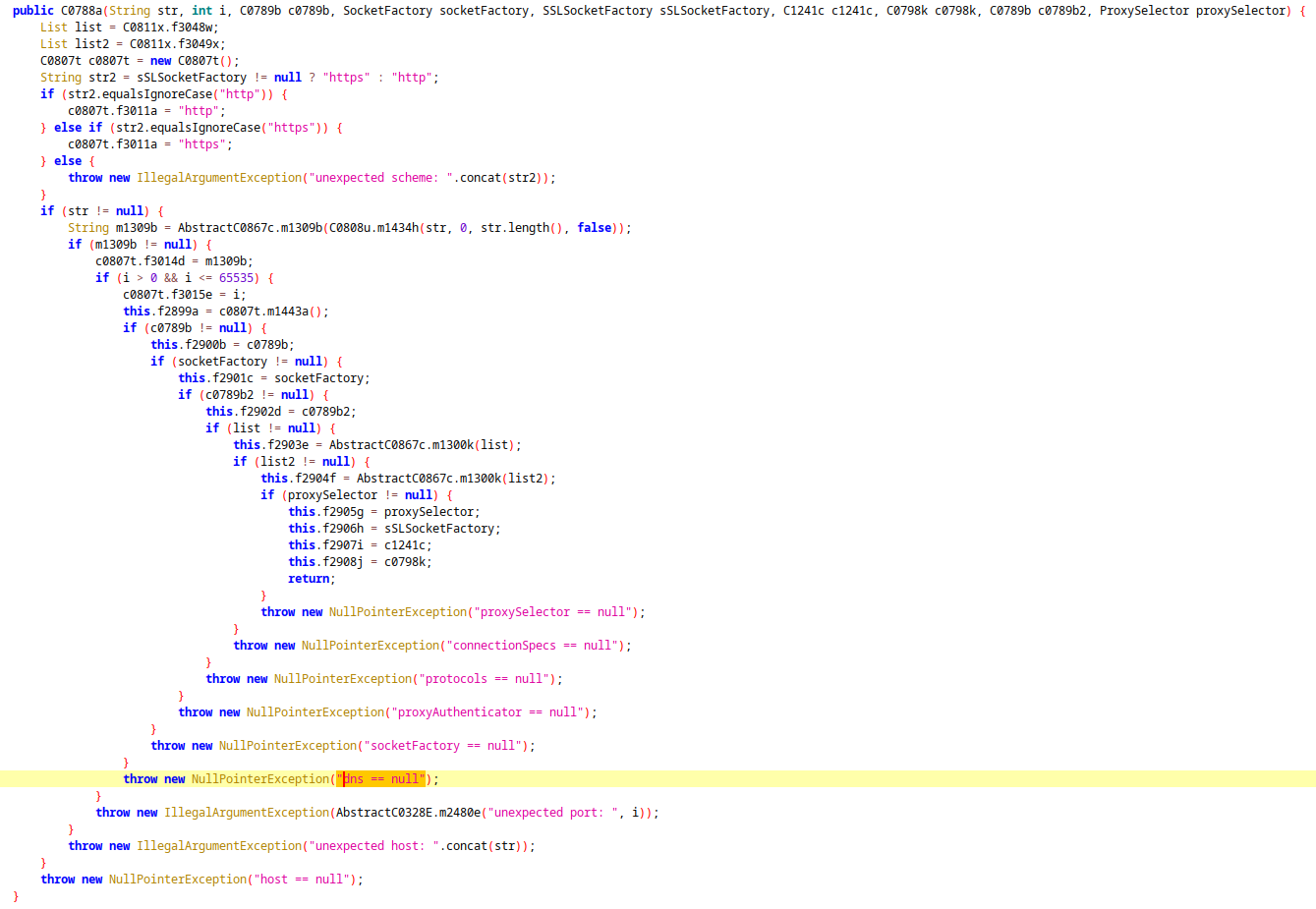
There is a function C0788a that creates a complete network object, probably to configure the entire network connection of an HTTP/HTTPS client in order to encapsulate a web browser or WebView for Spotify, which we will see later.
Ressources: https://developer.android.com/reference/android/webkit/WebSettings
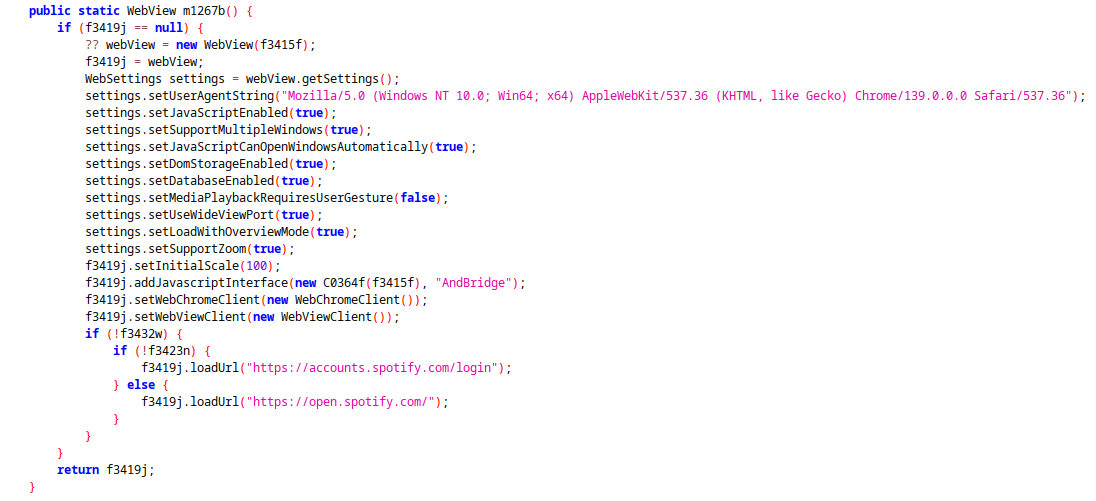
Next, we can see below that there is a public static WebView m1267b() function that builds and configures a WebView, which is a central component in the application.
WebView is an Android component that allows web content to be displayed in an application without using an external browser. In this app, it is used to load Spotify Web Player.
For example, here we can see which user agent it uses:
setUserAgentString("Mozilla/5.0 (Windows NT 10.0; Win64; x64) AppleWebKit/537.36 (KHTML, like Gecko) Chrome/139.0.0.0 Safari/537.36");
In the m1267b() function, there is a call to addJavascriptInterface.
This method is used to expose a Java object to JavaScript code executed in the WebView.
If the user is redirected to a malicious site, the JavaScript can access all public methods of the exposed Java object.
In the code, the name under which the object will be accessible in JavaScript is “AndBridge”. We will come back to this later.
if (!f3432w) {
    if (!f3423n) {
        f3419j.loadUrl("https://accounts.spotify.com/login");
    } else {
        f3419j.loadUrl("https://open.spotify.com/");
    }
}
Finally, there is a condition that calls the loadUrl function to the official Spotify website. The condition is probably used to check whether the user is already logged in or not. The two variables f3432w and f3423n are Booleans.
4. The execution of JavaScript
We already mentioned WebView a little earlier, but remember the addJavascriptInterface function that was called and used AndBridge as the name of the callable object.
In a function called C0363e, there is a call to AndBridge:
webView.evaluateJavascript("(function() {let l=document.querySelector('button[data-testid=web-player-link]');if(l) { AndBridge.loginDetected(); l.click(); }})();", null);
Here is the JavaScript code:
(function() {
    let l = document.querySelector('button[data-testid=web-player-link]');
    if (l) {
        AndBridge.loginDetected();
        l.click();
    }
})();
This is a self-invoking JavaScript function, which means that it is called immediately after its definition. This avoids having to call it. The function searches for an element in the HTML using querySelector, and if it is found, it uses loginDetected(), which sets a variable to true to indicate that the user is logged in, and saves this information persistently (see function below).
@JavascriptInterface
public void loginDetected() {
    AppSingleton.f3423n = true;
    AppSingleton.f3418i.putBoolean("LoggedIn", true);
    AppSingleton.f3418i.commit();
}
The C0364f class contains all the Java functions that can be executed in JavaScript via the addJavascriptInterface interface, but none of them are dangerous. The functions only use data relating to artists, music, and the user’s connection status.
The exposed methods:
- recMediaStatus(String) -> retrieves track, artist, position, cover art.
- recMediaPosition(long) -> playback position.
- wakeUp() / wakeOff() -> controls the status of the app in the background.
- deferMessage(String) -> displays messages in the UI.
Analysis:
- No direct access to SMS, contacts, system files, or banking tokens.
- Primarily focused on controlling the player and collecting Spotify statistics.
- Does not appear to be a classic stealer (no direct exfiltration of sensitive data).
5. Safety verdict
General architecture
The application is built around:
- A WebView loading Spotify Web
- A custom JavaScript injection
- An Android bridge exposed via @JavascriptInterface (AndBridge)
- A WebService to synchronize media information with Android
| Stream | |
|---|---|
| Spotify Web (DOM + injected JS) | |
| AndBridge (@JavascriptInterface) | |
| WebService | |
| MediaSession / Android Notification |
I didn’t find anything malicious in the app apart from the fact that the APK manages Spotify tokens. But the token is only used for Spotify, nothing is sent to a remote server. Be careful if the app is modified, a server could be added to send the token and thus gain control over your Spotify account.
There is also a hashmap that contains all Android services (battery, camera, microphone, etc.), but nothing is stored or sent.
Conclusion:
Spotifuck v1.6 is not active malware or a stealer. All sensitive functions are used to control the player and retrieve local Spotify data.
Warning: as the APK is not official, using your login details carries a theoretical risk if someone modifies the code.